
Render AI per Falegnami
Mostra ai clienti esattamente come apparirà la loro falegnameria su misura prima che venga effettuato un singolo taglio. Trasforma schizzi, disegni e foto del cantiere in Renders fotorealistici in meno di 60 secondi, e giustifica prezzi premium con immagini che parlano da sole.
Dal disegno di officina all'approvazione del cliente, immediatamente
Carica un disegno a mano o uno schizzo approssimativo di un armadio su misura, una libreria o un elemento per nicchia. Carve produce un Render fotorealistico nella stanza reale del cliente, senza congetture e senza sorprese.
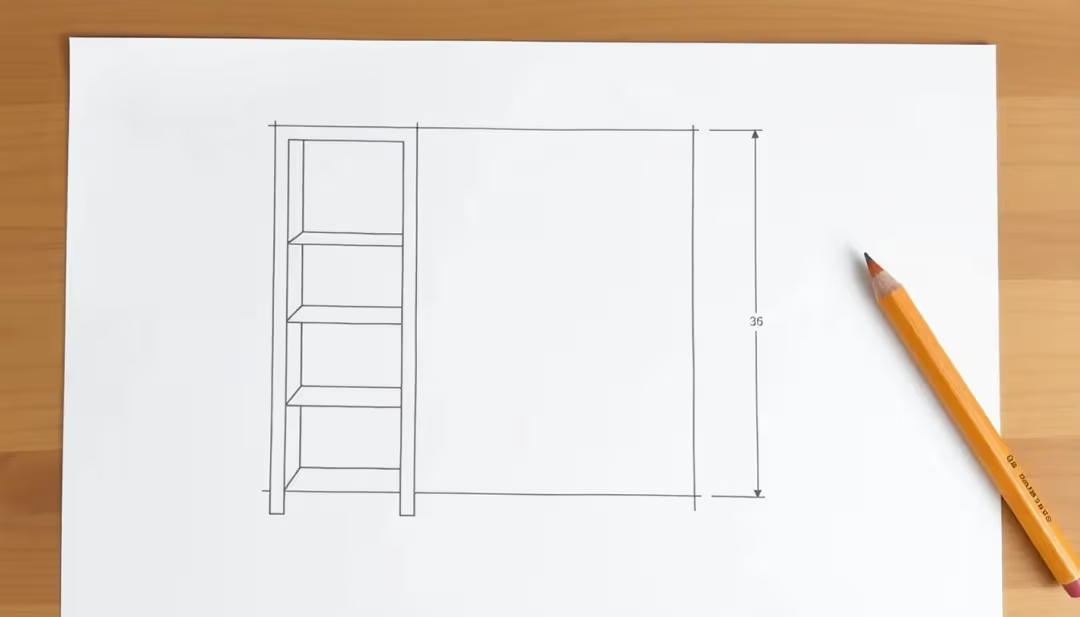 Schizzo di laboratorio
 Render fotorealistico
I problemi che Carve risolve
Prima di Carve
I clienti faticano a visualizzare
I disegni tecnici e i campioni di materiale non offrono ai clienti un'immagine chiara. Esitano, si fanno prendere dai dubbi e richiedono modifiche a lavori già avviati.
Preventivi e approvazioni lenti
Andare avanti e indietro sulle idee di design prima che un preventivo sia accettato costa tempo e ritarda l'avvio dei lavori.
Competere sul prezzo invece che sulla qualità
Senza immagini convincenti, è difficile giustificare un prezzo premium rispetto ai concorrenti più economici. Il lavoro si vende sul prezzo, non sulla maestria artigianale.
Con Carve
Renders a cui i clienti dicono sì
Mostra il pezzo finito nel loro spazio, con qualità fotorealistica. I clienti acquistano con sicurezza e approvano più rapidamente.
Preventivi visivi in meno di un minuto
Allega un Render a ogni preventivo. Bastano 60 secondi per distinguerti immediatamente dai concorrenti che inviano disegni e fogli di calcolo.
Giustifica i prezzi premium
Le immagini di qualità Studio mostrano il valore del lavoro prima ancora che venga realizzato. Vinci commesse grazie alla maestria artigianale, non al prezzo.
Tutto ciò di cui hai bisogno per vendere il mestiere
Render di falegnameria su misura
Visualizza armadi su misura, scaffalature a incasso, scale, sedute sotto finestra e qualsiasi elemento personalizzato, dallo schizzo al risultato fotorealistico.
Varianti di legno e finiture
Presenta rovere, noce, frassino, MDF laccato e molto altro. I clienti scelgono il loro rivestimento con sicurezza prima che venga ordinato un singolo materiale.
Render con contesto ambientale
Carica una foto del sito e inserisci la falegnameria nello spazio reale. I clienti vedono scala, proporzioni e adattamento nella propria abitazione.
Anteprime di hardware e dettagli
Sostituisci maniglie, cerniere, pomelli e profili dei bordi nel Render. Definisci ogni dettaglio prima che inizi la produzione.
Varianti di design multiple
Genera due o tre opzioni di layout dallo stesso brief e presentale affiancate. Meno cicli di revisione, decisioni più rapide.
Output in alta risoluzione 4K
Ogni Render viene automaticamente upscalato a 4K. Pronto per la stampa in preventivi, proposte e nel tuo portfolio.
Il tuo laboratorio, ora con un render studio
Render in 60 secondi
Un visual per il preventivo pronto prima che tu abbia finito di scrivere l'offerta.
Vinci più preventivi
Distinguiti dai concorrenti che inviano disegni in PDF e campioni di materiali.
Applica tariffe premium
Le immagini di qualità Studio comunicano il valore del tuo lavoro prima ancora che venga realizzato.
Meno modifiche a cantiere aperto
I clienti che vedono il risultato finale in anticipo richiedono meno costose modifiche tardive.
Esplora i materiali rapidamente
Cambia specie legnose e finiture all'istante, senza bisogno di campionari.
Crea il tuo portfolio
Render fotorealistici di progetti passati e futuri, pronti per il tuo sito web e i social.
Domande da falegnami
Schizzi a mano, disegni quotati, screenshot CAD, foto del cantiere o qualsiasi immagine dello spazio o del progetto, in formato JPG o PNG. Carve legge automaticamente profondità e struttura dell'immagine, così le proporzioni restano precise anche da input approssimativi.
Pronto a lasciare che il tuo lavoro vendersi da solo?
Unisciti a falegnami e carpentieri che già usano Carve per aggiudicarsi più preventivi, ridurre i cicli di revisione e farsi pagare quanto vale la loro maestria.